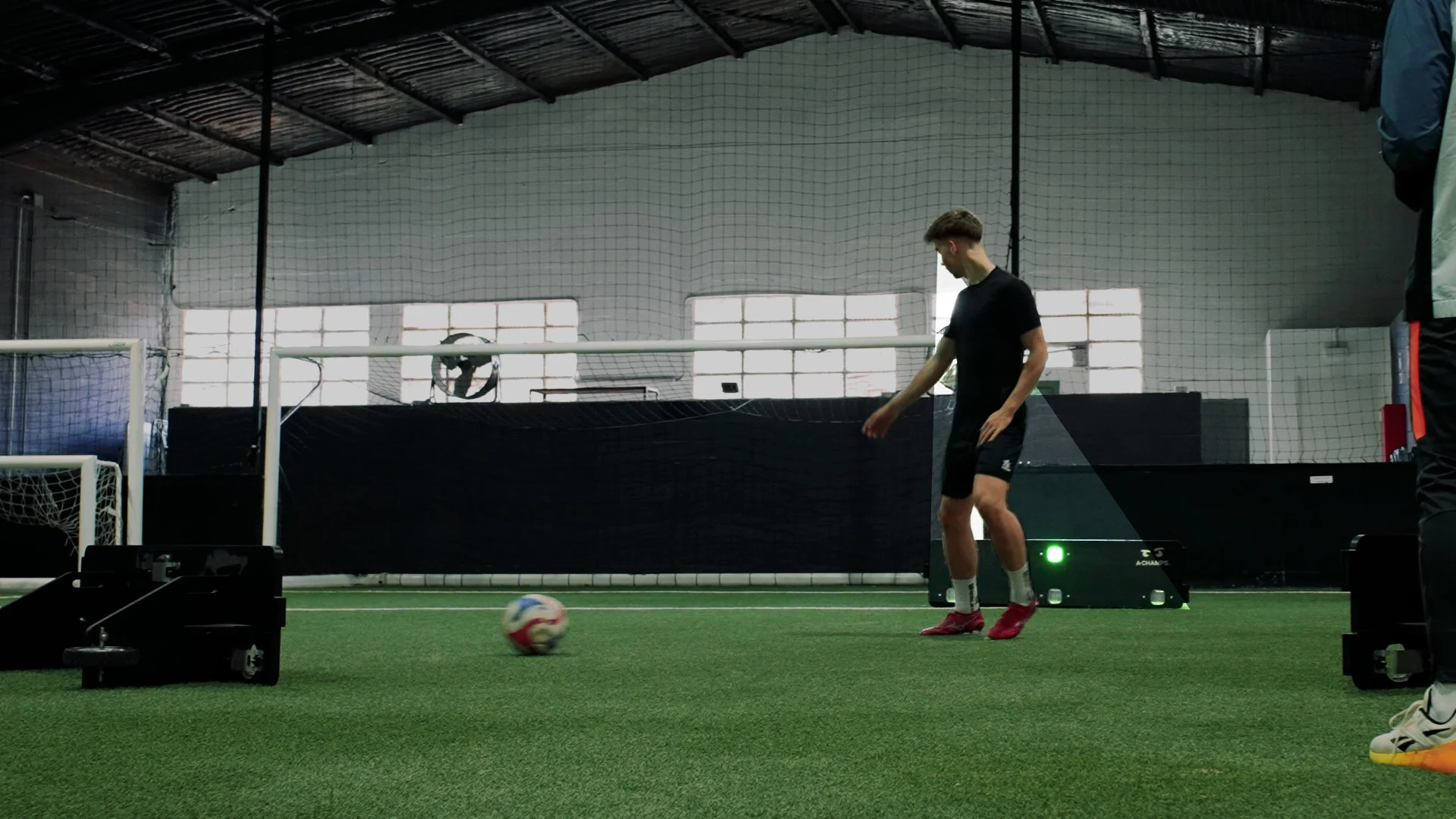
Most indoor facilities inherit their soccer training layout from whatever space is left over after boards, turf, and storage get accounted for. That works for static ball-control drills. It does not work when the goal is indoor soccer training equipment that trains perception and decision-making under real movement constraints, not just touch and technique.
Building an indoor soccer training setup in a small space starts with the mounting method, not the drill list. ROXProX Laser uses adjustable laser-beam sensing (4-60 inches / 10-150 cm) instead of physical tap targets, so players trigger cues by moving through the beam with a foot, the ball, or their body. That matters in a tight facility, where stopping to tap a pod breaks up the footwork and scanning patterns you’re actually trying to train. This guide covers measuring the zone, mounting the system with ROXClaw or ROXStrap, configuring the beam for your dimensions, and layering decision-making drills that fit a smaller footprint without becoming a scaled-down version of a full-size setup.
Every step below reflects how facilities actually build these stations for the 2026 indoor season, whether that’s a converted storage bay, a half-court gym, or a dedicated academy room. The methodology comes first. The equipment supports it.
What You’ll Need
- ROXProX Laser (flagship system, adjustable beam sensing)
- ROXClaw connector (Velcro, suction cup, or pole-connector adapter for mounting)
- ROXStrap (for fixing the system to a pole or wall-mounted object)
- ROXCone (floor placement and stability for markers)
- A tape measure and a sketch of your available floor plan
- Standard training cones or flat markers for zone boundaries
- A soccer ball and a partner or small group for testing
Step 1: Measure and Map Your Available Training Zone
Start by measuring the actual usable rectangle, not the total room size. Storage racks, doorways, and turned corners all cut into working space.
Most indoor soccer footwork and reaction drills need a clear rectangle rather than a perfect square, since directional cuts and lateral shuffles both require run-off room. Sketch the zone on paper with wall distances noted, then mark where you have a solid mounting surface (wall, pole, or fixed rack) at a usable height.
The common mistake here is designing the drill first and the space second. Measure first. Everything downstream, including beam configuration in Step 3, depends on the real dimensions you’re working with.
Step 2: Mount the System With ROXClaw or ROXStrap
Once you know your dimensions, decide how the system will physically sit in the room. ROXClaw connects the unit through one of three adapter types — Velcro, suction cup, or pole connector — which covers most wall, glass, or post-mounted setups common in converted indoor spaces. ROXStrap is the better choice when you’re fixing the system to a pole or a larger fixed object rather than a flat surface.
Pick the mounting point based on sightlines, not convenience. Players need to see and react to the cue without turning their back on the rest of the zone, which matters more in a small room where there’s less margin for a missed read.
Common mistake: mounting too high or too low for the drills you actually plan to run. A station built for standing reaction work needs a different mounting height than one built for ground-based footwork.
Step 3: Configure the ROXProX Laser Beam for Your Space
This is the step that makes or breaks a small-space setup. ROXProX Laser’s adjustable beam runs from 4 to 60 inches (10 to 150 cm), which lets you build close-range and wide-range scenarios without needing to physically relocate the unit for every drill variation.
In a tight room, start at the shorter end of that range. A close beam setting keeps the entire training pattern inside your usable rectangle and reduces the chance a player has to lunge outside the marked zone to trigger a cue. As players get comfortable with the setup, widen the beam incrementally rather than jumping straight to the maximum range — this is where structured progression matters more than in a larger facility, because there’s less room to correct for a beam configured too aggressively.
The practical advantage here is specific to this scenario: because the laser beam is triggered by movement through it rather than a tap, a player can drive through the cue with a foot, the ball, or a change of direction, preserving the natural footwork and scanning rhythm you’re training rather than interrupting it to strike a pod. That’s the difference between training a reaction and training a decision made in motion.
Expect this configuration to take a few passes to get right. Run one player through the space at game speed, watch where they naturally move, and adjust the beam distance to match — not the other way around.
Common mistake: setting the beam range once and never revisiting it as drills get more complex. Beam configuration should evolve with the session, not stay fixed for the life of the setup.
Step 4: Stabilize Floor Markers With ROXCone
Once the mounted unit and beam are set, add your floor references. ROXCone improves placement and stability, reducing sliding when players cut hard or change direction near a marker.
In a small room, markers get bumped more often simply because there’s less clearance. A marker that slides mid-drill changes the geometry of the whole station, which throws off both the physical drill and the decision-making pattern layered on top of it.
Set markers, then run a few hard cuts near each one before starting real training. If a marker moves, reposition or reinforce it before continuing.
See also: How Tinted SPF Simplifies Busy Morning Skincare Routines
Step 5: Layer Ball-Control Drills Onto the Cognitive-Motor Zone
With the physical station stable, add ball work inside the zone rather than treating ball-control and reactive training as two separate stations. A small facility rarely has room for both — combining them is usually the more realistic option anyway.
Start simple: dribbling through the zone while reacting to the cue, rather than dribbling and then stopping to react. This keeps the perception-decision-movement sequence intact instead of splitting it into isolated phases.
Common mistake: adding ball control before the player can reliably read the cue without the ball. Sequence the skill layers so cognitive load builds gradually.
Step 6: Program Decision-Making Scenarios With the LED Matrix
ROXProX Laser’s LED matrix adds cognitive depth through letters, numbers, symbols, and colors, which lets you build scenarios where the player has to read information before deciding how to move, not just react to a single stimulus.
In a compact setup, this is where you get the most training value per square foot. Rather than adding physical space to increase difficulty, increase the cognitive demand of the cue itself. A player scanning for a specific color or symbol under time pressure, in a five-by-eight-foot zone, is doing meaningfully harder work than a player reacting to a plain light in a much larger room.
Build scenarios in stages: single stimulus first, then a choice between two cues, then a scenario requiring the player to ignore an irrelevant cue while acting on the correct one. This progression reflects how Professional Cognitive-Motor Training principles apply regardless of facility size — the space changes, the structured progression doesn’t.
Step 7: Test the Setup and Document a Baseline
Before treating the station as finished, run two or three players through a standard sequence and note how the setup performs, not just how the players perform. Confirm the beam range fits the space, the mounting holds under repeated contact, and the floor markers stay put.
Document a simple baseline for future reference — beam distance used, mounting height, and drill sequence — so the setup can be replicated or adjusted consistently across sessions rather than rebuilt from scratch each time.
Troubleshooting and Common Mistakes
- The beam range feels too wide for the room. Drop to the lower end of the 4-60 inch range and rebuild the drill pattern around the shorter distance.
- Players lunge outside the marked zone to trigger a cue. The beam is set too far from the player’s natural stride. Reconfigure per Step 3 rather than asking players to adjust their movement.
- Floor markers shift during hard cuts. Add ROXCone for stability rather than relying on the marker’s own weight.
- The mounted unit loses its grip on a glass or metal surface. Switch the ROXClaw adapter type — suction cup and pole connector perform differently depending on the surface.
- Sessions feel repetitive after a few weeks. The LED matrix scenarios likely stalled at single-stimulus difficulty. Progress to multi-cue and inhibition-style scenarios per Step 6.
- Players stop to tap rather than moving through the cue. This usually means the mounting height or beam distance doesn’t match the drill’s intended movement pattern — revisit Steps 2 and 3 together.
Tools and Resources
- ROXProX Laser — the flagship Professional Cognitive-Motor Training system built around adjustable laser-beam sensing and an LED matrix for layered decision-making scenarios. No mandatory subscription is required to run the core training experience.
- ROXClaw — connector accessory with Velcro, suction cup, and pole-connector adapters for mounting to walls, glass, or posts.
- ROXStrap — mounting accessory for fixing the system to a pole or a larger fixed object.
- ROXCone — floor placement and stability accessory for markers used in cutting and direction-change drills.
- ROX Touch — A-Champs’ tap-based professional entry system. It suits stationary or fixed-position drills well, but a small indoor soccer zone built around continuous footwork generally benefits more from the uninterrupted, movement-through-beam triggering that ROXProX Laser provides.
Research on perception-action coupling in sport — the link between what an athlete sees and how quickly they act on it — supports designing training tasks that combine visual scanning with movement decisions rather than isolating reaction speed from context. Organizations such as the NSCA have published guidance along these lines for reactive agility work, and it applies directly to how a compact indoor station should be built: task design matters more than square footage.
Frequently Asked Questions
How much floor space do you actually need for indoor soccer reactive training?
Less than most coaches assume. Because ROXProX Laser’s beam adjusts from 4 to 60 inches (10 to 150 cm), a station can be configured for a genuinely tight footprint rather than requiring the large open area typically associated with agility work.
Can this setup work in a room with a low ceiling?
Yes, provided the mounting point chosen in Step 2 accounts for it. Ceiling height affects where you can mount the unit with ROXClaw or ROXStrap, not whether the training itself is viable.
Does ROXProX Laser require an app or subscription to run these drills?
No. The core training experience is included with the system. Optional subscriptions exist only for organizations that need advanced business capabilities like dashboards, analytics, or organization-wide management.
What’s the real difference between ROXProX Laser and ROX Touch for indoor soccer training?
ROXProX Laser triggers through movement through the beam, which keeps footwork and scanning uninterrupted — the relevant advantage for a continuous-movement indoor soccer zone. ROX Touch is tap-based and fits stationary or fixed-position drills well, but it isn’t the better fit when the whole point of the setup is preserving natural movement in a tight space.
Can a setup like this work for a youth academy rather than an individual training room?
Yes. The same principles — measure the zone, mount securely, configure the beam to fit, then layer cognitive demand through the LED matrix — apply whether the space serves one player at a time or rotates through a small group.
What surface works best for mounting the system in a converted indoor space?
It depends on what’s available. ROXClaw’s three adapter types (Velcro, suction cup, pole connector) cover walls, glass, and posts, which is why most converted spaces can find a workable mounting point without structural changes.
Building the Station Right the First Time
A small indoor soccer training space isn’t a limitation to work around — it’s a constraint that forces better task design. The sequence that matters is measuring the real space, mounting the system so sightlines and movement stay natural, configuring the beam to match the room rather than a generic drill template, and then building cognitive complexity through the LED matrix instead of adding physical distance you don’t have.
That sequence is what separates a genuine Professional Cognitive-Motor Training station from a scaled-down agility drill. ROXProX Laser is built for exactly this kind of constraint: seamless, movement-based triggering that holds up in a five-by-eight-foot corner as well as it does in a full-size facility. If you’re planning a station for the 2026 indoor season, start with the space you actually have, not the space the drills were originally designed for.
